Problem
General AI chat can feel too broad for a student's actual task, project and level.
Featured AI product · Functional prototype
A focused AI workspace for Multimedia Design students, combining specialised assistants, project context and clear interface states.
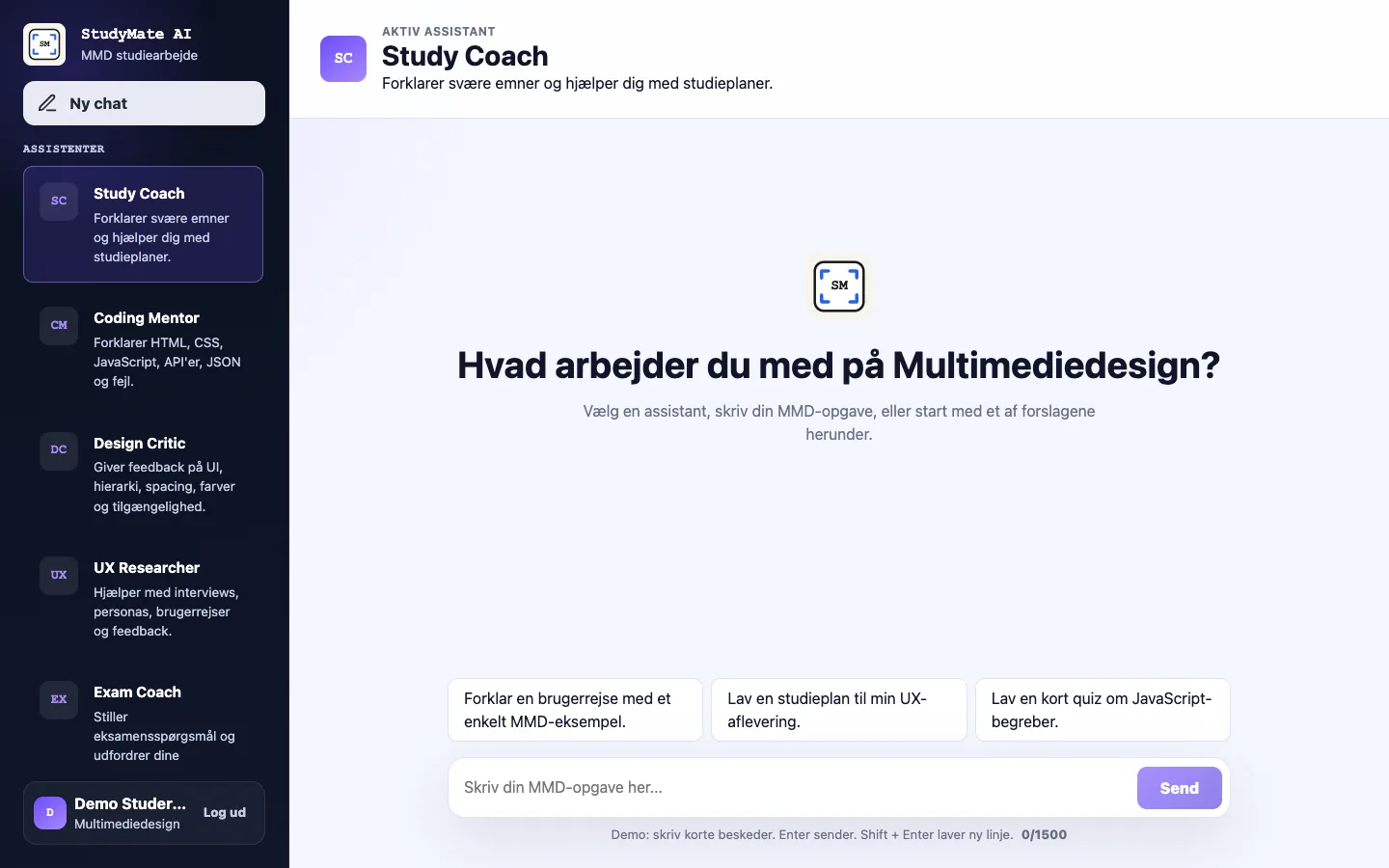
General AI chat can feel too broad for a student's actual task, project and level.
Multimedia Design students working with code, design, UX, exams and project planning.
Product concept, UI design, frontend, backend structure, prompts and deployment preparation.
HTML, CSS, JavaScript, Node.js, Express, OpenAI API, Markdown knowledge files and Cloudflare preparation.
Explore the product experience and the technical decisions behind the prototype.
01
Generic AI tools can give broad answers that feel disconnected from a student's current task. Students need focused support without writing a new role prompt every time.
A general chatbot does not automatically understand the subject, expected level or project context.
Students should not need to redefine a coding mentor, design critic or study coach in every conversation.
02
StudyMate combines six clear assistant roles, relevant project context and a calm workspace. The selected role shapes the support while the interface stays familiar.
Plans, explains and supports learning strategies.
Supports HTML, CSS, JavaScript, APIs and debugging.
Reviews hierarchy, visual choices and accessibility.
Supports research, user journeys and testing plans.
Challenges arguments and prepares project questions.
Turns project needs into priorities and manageable tasks.
03
The interface uses familiar chat patterns and makes assistant choice, system state and prototype limits visible before they become confusing.
Continue without creating a real account.
Compare focused roles before starting.
Use a suggestion or enter a specific study task.
See loading, success, error or an honest static fallback.
04
An internal walkthrough improved fallback copy and interaction clarity. External usability testing is still planned and is not presented as completed research.
Status: Planned — external testing has not yet been completed.
Test with 3–5 Multimedia Design students whether they understand the assistant roles, complete the chat flow and recognise the static demo limits.
Record task completion, critical errors, moderator assistance, hesitation, wrong turns and participant comments.
Findings and resulting design changes remain pending until the external sessions are completed.
Focused assistant roles and visible states make the product idea easier to understand.
Balancing a simple interface with useful AI behaviour and honest prototype limits.
Run sessions with 3–5 students, strengthen context handling and test the server-backed deployment.
01
The browser controls the interface. A server-side route owns validation, assistant configuration, context building, the secret key and the OpenAI request.
Chooses a role and enters a study task.
JavaScript manages selection and response states.
The frontend sends assistantId and the message to POST /api/chat.
Validates input and builds server-owned instructions.
Receives the prepared request from the server.
Renders success, error, retry or static fallback.
02
The user chooses a visible assistant. The server then combines that role with internal instructions, relevant context and the current message.
A stable assistant ID maps to a focused support role.
Relevant Markdown excerpts are selected with weighted phrases and keywords.
The protected route combines role, context and message.
The frontend communicates progress and failure clearly.
03
The local prototype uses understandable Markdown files and weighted matching. It is not semantic search and can miss useful context.
Local Markdown content is selected through simple keyword and phrase weighting.
There are no embeddings, semantic retrieval or production database in the current version.
04
The API key stays server-side, but deployment protection is still prototype-level. Cloudflare testing, stronger abuse controls and real user validation remain unfinished.
GitHub Pages shows the complete interface with static fallback responses.
Express can send protected OpenAI requests when a local environment key is present.
Validate Cloudflare deployment first, then evaluate Supabase for accounts, stored projects and controlled context.
Client website · Content hierarchy and frontend